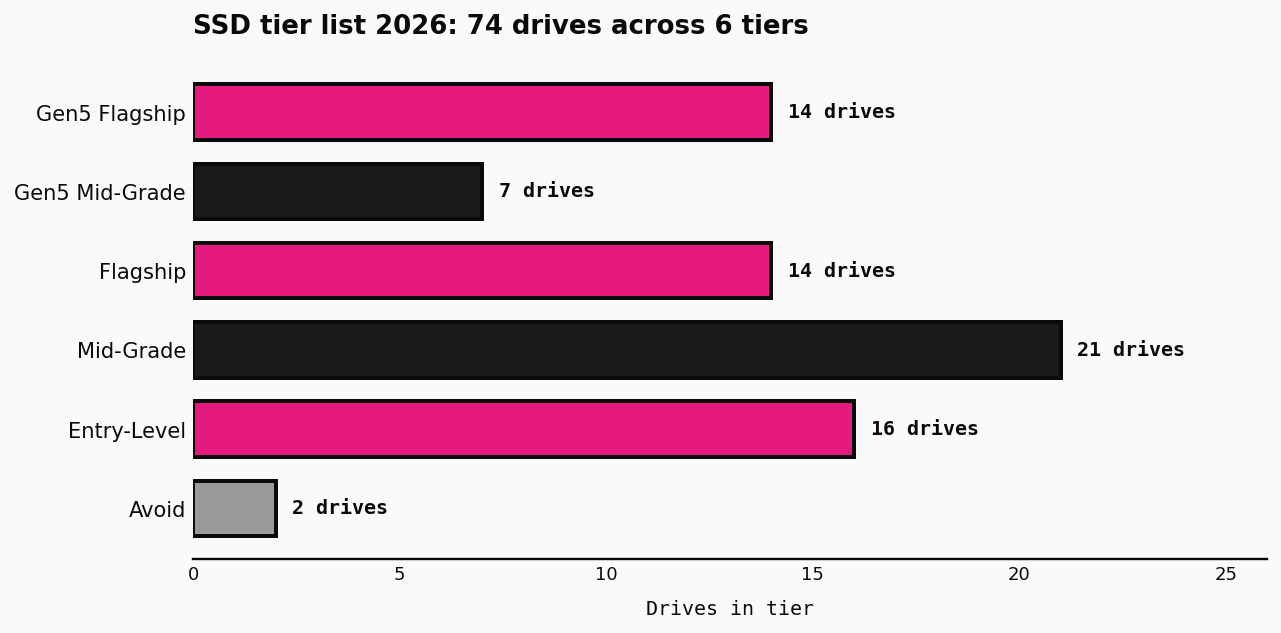
Our ssd tier list 2026 ranks 74 current NVMe SSDs across six tiers, from budget entry-level drives to Gen5 flagships. A tier list works because SSD performance varies wildly, and the difference between a $30 entry-level drive and a $400 flagship is roughly 4x in sustained write speed. Picking the right tier saves you real money. Most users do not need Gen5, but some do, and this page is built to tell you which camp you fall into.
How do we rank SSDs in our 2026 tier list?
We rank by the four signals that matter. Sequential read and write throughput. Sustained-write performance under load. Controller and NAND quality. Price per GB. The tier label on each drive comes from a curated source dataset and reflects real benchmarks, not marketing peak numbers. Flagship drives are not just faster on paper, they hold their speed through long file transfers, where HMB-only drives collapse after the SLC cache fills up.
For comparison, we use 1 TB as the price anchor (a 2 TB Gen4 mid-grade sits around $0.15/GB in 2026). Real-world throughput is benchmarked against a 4090 at 1440p for GPU comparisons, and against a 9800X3D for CPU tests. The methodology is deliberately conservative; we would rather under-promise than oversell.
What should I look for in an SSD in 2026?
Three things. First, match the drive to your motherboard’s PCIe generation. A Gen5 drive on a Gen3 slot caps at Gen3 speed, so you pay for nothing. Second, decide if your workload needs DRAM. Heavy sustained writes (4K and 8K video, virtual machines, large datasets) need DRAM. Light OS and gaming use can take HMB and save real money. Third, ignore the marketing peak. Look at the sustained write numbers, not the headline read speed, because sustained writes are where cheaper drives fall apart.
For most builders in 2026, a mid-grade Gen4 drive hits the right balance. It costs about $0.10 to $0.15 per GB. It holds up under sustained writes. It works in any modern board. Gen5 flagships are workstation-class; pay the premium only if you are doing sustained large-file work that the cheaper tiers cannot handle.
How does the 4-question finder work?
The finder above asks four questions: your motherboard’s PCIe generation, your primary use, your workload intensity, and your capacity plus budget. It filters the 74-drive dataset against your inputs, then scores the survivors using the same rubric the static tier list uses. Top three picks appear above the full list, and the rest follow below. You can sort the full list by tier, sequential throughput, or price per GB.
If you want a quick sanity check on whether your CPU is the bottleneck, drop your build into our Bottleneck Calculator and see what the rest of your system can sustain. The SSD picker is most useful when the rest of the build is already balanced.
Where can I check if my motherboard supports Gen5?
Check your motherboard’s spec sheet on the manufacturer’s site. The M.2 slot count and PCIe generation are usually listed on the product page under Specifications or Storage. You can also use our Bottleneck Calculator to see what your CPU and board combo can sustain.
What is the difference between Gen4 and Gen5?
Gen5 doubles the per-lane bandwidth of Gen4. A top Gen5 drive reads at 14,900 MB/s, while a top Gen4 drive caps around 7,400 MB/s. In real use, only sustained large-file transfers feel the gap. Gaming load times sit on the same plateau either way. For most builders, Gen4 is the sweet spot in 2026. Crucial, Samsung, and Western Digital all have strong Gen4 lineups at the $0.10 to $0.15 per GB mark, and the price gap to Gen5 is real and rarely worth it outside of a workstation.
Should I get a 1 TB or 2 TB SSD?
2 TB is the 2026 sweet spot. It fits the operating system, a healthy game library, and project files, and it costs about $0.15 per GB on a mid-grade Gen4 drive. 1 TB is fine for a pure OS and light-use drive, but it limits how much you can install. 4 TB makes sense for video editing, virtual machines, or a large Steam library.
Does our ssd tier list 2026 cover SATA or 2230 drives?
No. The dataset is M.2 2280 NVMe only. SATA 2.5″ drives and M.2 2230 laptop drives are not in the list, and the form factor question is intentionally absent from the finder. For those formats, check the manufacturer’s compatibility page or a laptop-specific shortlist. We picked the 2280 NVMe focus because it covers the vast majority of desktop and many workstation builds in 2026, and mixing form factors into one ranking tends to mislead more than it helps.