Our psu tier list 2026 ranks 1,089 current PC power supplies across 13 letter-grade tiers, from A+ reference units down to F-tier units to skip. The list pulls from a curated source dataset and is sorted by four signals: platform quality, component choice, 80+ certification, and ATX version. Use the finder above to score every PSU against your wattage, use case, efficiency, modularity, and budget. The full 2026 ranking sits below the chart.
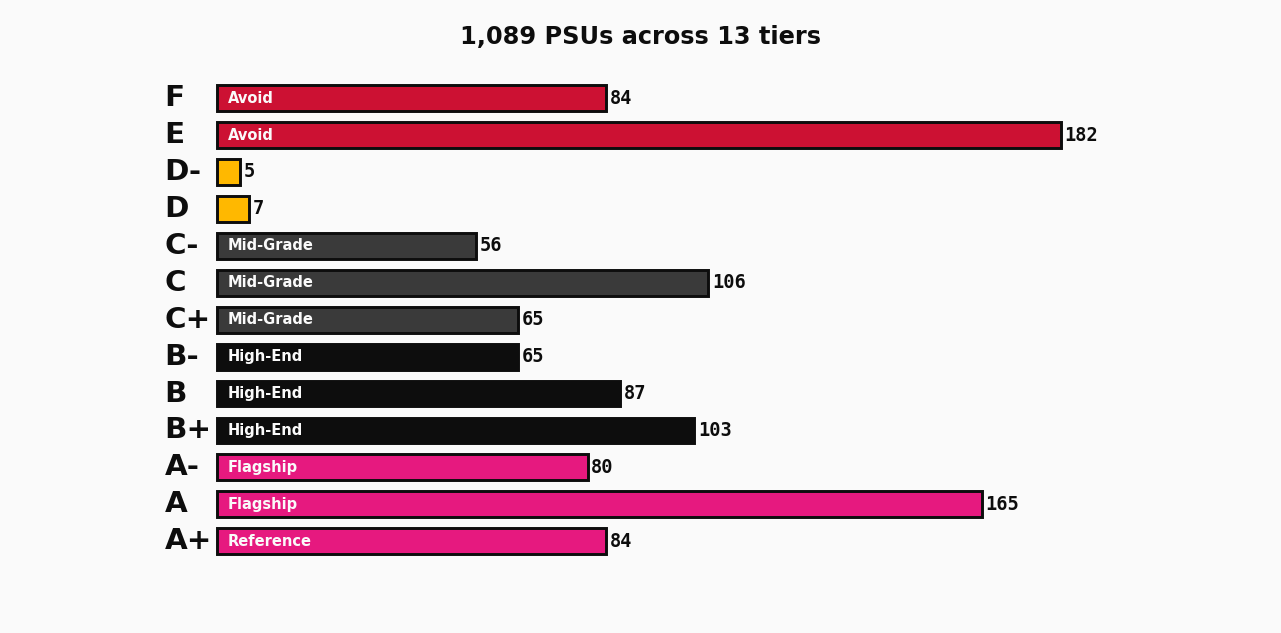
How do we rank PSUs in our 2026 tier list?
We rank by four signals that matter. Platform quality and OEM reputation. Component choice, especially the primary capacitors and the fan. 80+ certification, where Gold and above signal tighter voltage regulation and better idle efficiency. ATX version, where ATX 3.x is the current spec for new builds with modern GPUs. The letter grade on each unit comes from a curated source dataset and reflects professional reviews, not marketing peak numbers.
We are deliberately conservative on the top end. Very few units earn A+, and the tier distribution is heavily weighted toward B and C. That matches the actual quality distribution in the market. The D, E, and F tiers are reserved for known platform issues, weak build quality at the price asked, or units that have been replaced by something better from the same OEM.
What does each tier mean?
Each letter maps to a quality band. The table below gives the short version. The full ranking sits below the chart in the tier-by-tier section.
| Tier | Band | What it means |
|---|---|---|
| A+ | Reference | Top of class. Worth a 10 to 20 percent premium for the right build. |
| A | Flagship | Best in class on most metrics. Buy with confidence. |
| A- | Flagship | Excellent. Slight tradeoff on one axis. Still a strong pick. |
| B+ | High-end | Solid build quality and clean power. The sweet spot for most builds. |
| B | High-end | Good overall. Reaches for the high-end tier but does not quite land. |
| B- | High-end | Acceptable. One minor weakness versus B+ units in the same price band. |
| C+ | Mid-grade | Mid-range. Fine for office and light gaming. |
| C | Mid-grade | Mid-range. Acceptable for budget builds under 550W. |
| C- | Mid-grade | Mid-range with one flagged issue. Read the source notes before buying. |
| D | Budget | Budget. Works, but with caveats. Avoid for high-wattage builds. |
| D- | Budget | Budget with known issues. Skip if a B-tier unit fits the budget. |
| E | Avoid | Avoid. Known platform problem or weak build quality at the price asked. |
| F | Avoid | Avoid. Unsafe, dead platform, or replaced by a better unit from the same brand. |
How much wattage do I actually need?
Wattage math is the single most common mistake in PC builds. The rule of thumb: take your CPU TDP, add your GPU TDP, multiply by 1.3, and round up to the next standard PSU size. A Ryzen 7 9800X3D at 120W plus an RTX 5070 Ti at 300W gives 546W. The 1.3 multiplier covers transient spikes and leaves headroom. Round up to 750W. That is the right pick, not 1000W.
You can use the TechWafer Bottleneck Calculator to score a specific CPU and GPU pair before you buy. The bottleneck score tells you whether your PSU choice leaves the CPU or GPU starved. A 10 to 20 percent bottleneck at peak load is normal and acceptable. Anything over 30 percent means the build is unbalanced.
For a per-part check on a specific CPU and GPU combination, the CPU compare hub and the GPU compare hub list every reviewed pair with the bottleneck score, the tier, and the recommended PSU wattage for that build. If you already know the CPU and GPU, those two tools are faster than this list.
What is ATX 3.x and does my PSU need it?
ATX 3.x is the current Intel PSU specification, released in 2022 and updated through 2024. It adds three things that matter for modern builds. First, the 12VHPWR connector for GPUs that can pull 600W through a single cable. Second, a 200 percent peak power tolerance for 100 microseconds, which handles the transient spikes of modern GPUs without triggering protection circuits. Third, tighter ripple limits on the 12V rail.
If you are buying an RTX 4000 or 5000 series GPU, you want ATX 3.x. Older ATX 2.x PSUs work with the included 8-pin to 12VHPWR adapter, but the adapter is stiff, the cable gets hot under sustained load, and the connection can fail. ATX 3.x cables are designed for the load. The premium is typically $20 to $30 over a comparable ATX 2.x unit. Worth it for any GPU rated 450W or higher.
What does 80+ Gold actually get me?
The 80+ programme certifies that a PSU is at least 80 percent efficient at 20, 50, and 100 percent of rated load. The higher tiers raise the bar. Gold requires 90 percent efficiency at 50 percent load. Platinum hits 92 percent. Titanium pushes 94 percent. The real-world difference in your electric bill is small, roughly 50 kWh per year for a gaming PC running 4 hours a day.
The bigger reason to care is build quality. Gold units tend to use better capacitors, quieter fans, and tighter voltage regulation across all loads. For a 2026 build, Gold is the sensible baseline. Bronze is fine for office machines and budget gaming rigs. Platinum and Titanium only make sense for workstations that pull 600W or more for 8 hours a day, where the efficiency gain covers the price premium in 2 to 3 years. The certification letter on the unit is the easiest way to filter, and our finder lets you set a minimum.
Do I need a fully modular PSU?
Fully modular PSUs let you plug in only the cables you need, which makes cable management cleaner and improves airflow. Semi-modular fixes the 24-pin and EPS cables in place and lets you add the rest as needed. Fixed, also called non-modular, has every cable hardwired. In 2026, the case for fully modular is strong. ATX 3.x 12VHPWR cables are stiff and short, and routing them behind a motherboard tray is much easier without the clutter of unused cables.
The price premium for fully modular is usually $10 to $20 over semi-modular at the same tier, and that gap has narrowed over the years. For a single-GPU gaming build with a mid-range case, semi-modular is fine. For a dual-GPU or high-wattage workstation, fully modular is the only sane choice. Our finder has a modularity filter so you can lock it down.
What is the best PSU for a gaming PC in 2026?
It depends on the GPU. A 9070 XT build pairs with a 750W Gold unit. A 5080 build bumps to 850W. A 5090 build wants 1000W. The PSU list above answers the question directly when you give the finder your GPU. The Tier A+ units on the list are all reference-grade. The Tier A units are the ones we recommend for most high-end gaming builds.
For a sense of how the other components line up, the SSD tier list ranks 74 NVMe drives across 6 performance tiers, with a matching 4-question finder. Pair that with this PSU list and the bottleneck calculator, and you have the three building blocks for a balanced 2026 build.
How does this psu tier list 2026 compare to other rankings?
Other PSU tier lists (Cultists Network, Linus Tech Tips forum, Hardware Busters) tend to use similar letter-grade scales, but the boundaries between tiers differ. A unit rated B on one list might be B+ on another because of how the reviewer weighs efficiency versus platform quality. Our list is more conservative on the top end. The D, E, and F tiers are where every credible source agrees.
If you are cross-referencing our tier list with another source, focus on the A, B, and C tiers. The differences are in how the borderline A- and B+ units are classified. That is where our finder scoring takes over. Rather than asking which tier a unit belongs to, it scores each unit against your specific inputs, so the answer changes with your use case.
What about server and workstation PSUs?
Server and workstation PSUs are a different category. They prioritise 24/7 reliability, hold their rated load indefinitely, and often include redundant capability (two PSUs sharing the load, with one taking over if the other fails). The dataset behind this list does not break out redundant units separately. If you are building a server, our finder has a Server / 24/7 use case that locks the tier filter to A+ and A only, which is the right place to start.
For workstations, the workstation use case rewards high tier and full modularity, but also accepts B+ and B units if the workload is light. A 650W B-tier unit is fine for a 4-core rendering rig. A 1000W A-tier unit is the right pick for an 8K video editing workstation that pulls 700W sustained.n, but a surge protector handles the input spikes from the wall. In areas with frequent brownouts, a UPS is the difference between a 5-year PSU and a 10-year PSU.
Updated 17 August 2026. The tier dataset is refreshed monthly. Source: curated third-party PSU list. Affiliate links via Amazon (tag: techwafercom-20).